VS Code extension
Share Localhost. Right From VS Code.
Turn your running development server into a shareable HTTPS preview link without leaving your editor.
Preview release · Manual install
Needs VS Code 1.90 or newer and a free Localians account.
What it does
Everything you need, inside the editor.
No terminal commands, no deploys and no second tool to install: the extension includes the same tunnel client as the Localians CLI.
Share local ports
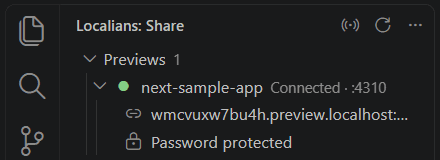
Pick a running dev server and share it. One share per port, stopped from the sidebar or the status bar.
Secure HTTPS links
Every preview is reached over HTTPS. The link is copied for you when the tunnel is confirmed.
Your Localians account
Approve VS Code in your browser once. The sign-in is a revocable token kept in VS Code's Secret Storage.
Copy and manage links
Previews stay listed with their status. Copy, open, stop or share again, even for previews started elsewhere.
Project detection
Finds apps running on common ports, recognizes frameworks in your workspace, and matches the project that uses that port.
Access and timing
Choose public or password protected, and how long the link works. Localians applies the project's free preview or Preview Pass.
Three steps
From editor to link in a minute.
- 01
Install the extension
From the Marketplace (coming soon), or by hand from a downloaded .vsix file.
- 02
Connect your account
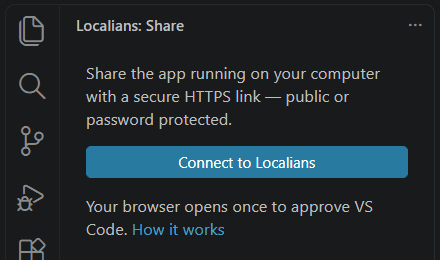
Click Connect to Localians. Your browser opens once so you can approve VS Code.
- 03
Share your app
Start your dev server, click it under Local apps, choose who can open it, and send the copied link.
Install
Download VSIX
Install Localians for VS Code from a file now, or from the Marketplace once it is published there.
Localians for VS Code 0.1.0
Free · Windows, macOS and Linux · installs in VS Code with Install from VSIX.
40 KB, downloaded from this site. A GitHub Releases mirror follows.
- Extension
- Localians — Share Localhost
- Version
- 0.1.0
- Publisher
- THINXIFY (thinxify.localians)
- Requires
- VS Code 1.90 or newer
- File
- localians-0.1.0.vsix · 40 KB
SHA-256 checksum
b9fc9fbe3677eedb546d6ca3c33df56d7914790b8c0c58a9df085f10995cded8Install from a .vsix file
Four steps, about a minute.
- DownloadSave
localians-0.1.0.vsixwith the Download VSIX button. - Check it (recommended)Its SHA-256 must equal the checksum above.
# Windows PowerShell
Get-FileHash .\localians-0.1.0.vsix -Algorithm SHA256

# macOS / Linux
shasum -a 256 localians-0.1.0.vsix
- Install from VSIXOpen Extensions (Ctrl+Shift+X, or Cmd+Shift+X on a Mac), click the … (Views and More Actions) menu at the top right, choose Install from VSIX… and select the file. Or run Extensions: Install from VSIX… from the Command Palette.
- ConnectOpen the Localians view in the activity bar and click Connect to Localians. Reload VS Code first if it asks you to.
Install from MarketplaceComing soon
The extension isn't on the Visual Studio Marketplace yet. When it is, you'll be able to install it with one click and get automatic updates.
Your editor. Ready to share.
Start with a free Localians account. Every project gets a free 24-hour preview.